From the first idea to a song you can share
Download Cadence for iPhone and iPad or get Cadence for Android. The overall case for Cadence is how much of a song you can develop in the same workspace, wherever you start.
- Capture an idea. Start with a line, import a beat or bring in a voice memo and turn the recording into an editable lyric. Use Production Notes to collect sounds from audio or video for later sample export.
- Write and revise. See rhyme patterns in the editor, check syllables and explore perfect, slant, multisyllabic, multi-word and assonance matches. Use built-in English or download one of 20 additional language packs.
- Rehearse and record. Loop the part you’re working on, record two deliveries and keep the stronger take beside the lyric. Keep the alternate if you want to revisit the performance.
- Arrange, mix and export. With Pro, assign takes to timed sections, build the draft in the mobile DAW, use vocal FX and export a mix or aligned WAV stems for a producer.
- Return to the work. Organize songs into projects, hear locally available demos in the offline player and use writing activity to see when you’ve been returning to your ideas.
Start with three free notes. The full Draft-to-DAW workflow and export require Pro. Check the current offer in your store.
What makes Cadence the best overall songwriting app
Cadence puts writing, rehearsal, recording, production and listening in one mobile workspace. Here’s what you can use in a real session.
- Beat player with cue points. See the waveform, set independent A–B loop points and add named Song Map markers at timestamps such as a verse, hook or drop. Use those markers when placing sections. See how the beat player works.
- 21 rhyme language options. English is built in, and 20 downloadable packs cover languages including Spanish, French, Hindi, Arabic and Brazilian Portuguese. Set which language comes first when you write across languages. See all rhyme languages.
- A free local music player. Play locally available beats, demos and finished tracks offline, organize them into playlists and listen with the screen locked. Explore Cadence Listen.
- Production Notes for sampling. Bring audio in from a file or extract sound from a video you can use. Save the sound with your notes and export it for a production session. See the sample workflow.
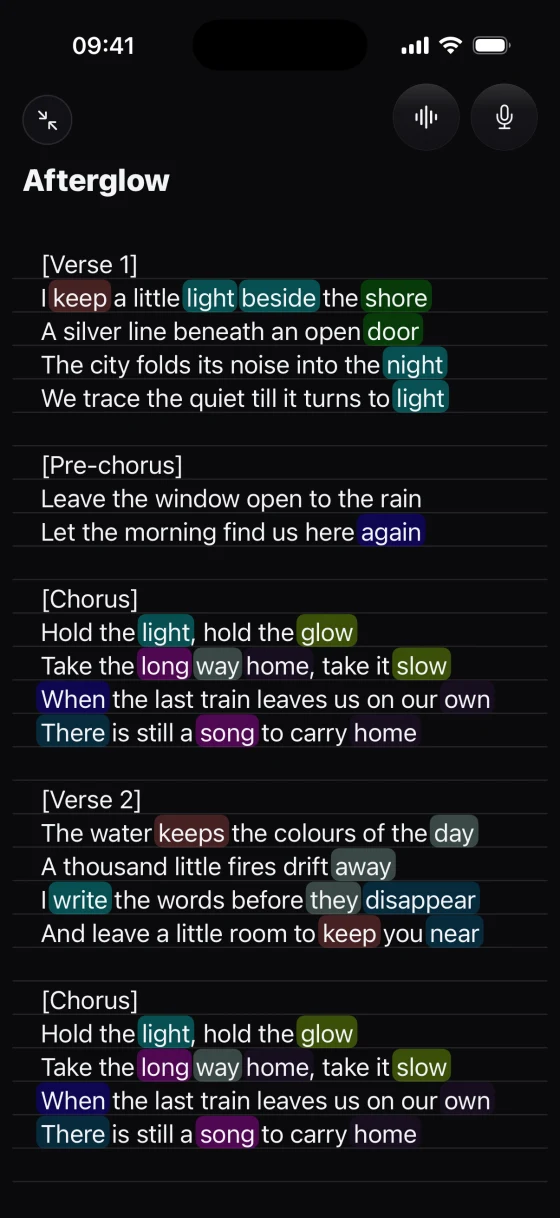
- An interface built around the song. See highlighted rhymes beside the lyric, use the beat waveform to find your place and compare recorded takes before moving into the DAW. See the Cadence interface and watch the stem export.
Available today: Start with three free notes. Pro unlocks unlimited new notes and the complete Draft-to-DAW workflow. Upcoming: Cadence plans to make on-device creation free and charge for cloud storage and use across multiple devices.
Cadence offers 21 rhyme language options
Cadence: English is built in, with 20 downloadable rhyme packs, including Spanish, French, Brazilian Portuguese, Hindi, Arabic and Nigerian Pidgin. Reorder the enabled packs to give the language you want priority, then test the suggestions against the way you pronounce the line.
SongRight: Its iPhone and iPad listing documents offline rhymes in English and Spanish. Cadence covers both and adds 19 more rhyme language options. These counts refer to rhyme support.
Cadence compared with SongRight, Song Cage, BandLab and GarageBand
Cadence comes first for the overall songwriting workflow. The table compares how each product takes an idea through writing, recording and the next edit.
| App | Workflow to try | What decides the fit |
|---|---|---|
| Cadence | Capture a lyric, voice memo or beat. Develop the words with on-device rhymes and keep recorded takes with the draft. | 21 rhyme language options, timed sections, a mobile DAW and aligned WAV export with Pro. |
| SongRight | Keep a song note and record layers in its mobile studio. | Documents English and Spanish rhyme support. The language comparison above gives both apps’ coverage. |
| Song Cage | Capture a lyric, melody memo or chord sketch on a phone. | The vendor describes finishing the arrangement on web or desktop, which suits a workflow that moves back to a computer. |
| BandLab | Start a cloud Studio project, add an instrument or audio track and build up a recording. | Consider it when layered production, virtual instruments or working in a browser are central. |
| GarageBand | Play Touch Instruments and record a track-based demo on iPhone or iPad. | Consider it when the next job is playing and arranging instruments on Apple hardware. |
A real decision you can make before arranging
Imagine a hook that reads well but pushes the last word past the downbeat. Loop the last two bars of the verse and first two of the hook. Record one version with the original line and another that drops two syllables. Keep both takes beside the lyric. If the shorter line gives the hook room to breathe, use that take in the draft and leave the first one available as a reference.
Try the same exercise with the browser syllable counter before opening the app. Then use the section recording walkthrough to see where the take belongs.
Watch what happens before and after the take
Watch the beat-to-vocal walkthrough to see an instrumental imported, a passage looped and a vocal take recorded. Follow the transcript if you want to find the menu or repeat the step on your device.
Then watch Springtime Showers move from its verse and hook assignments into the DAW and export as six WAV stems. These are two separately recorded demonstrations. The walkthrough pages identify the build and what each recording covers.
For a producer handoff, export a mix so the recipient can hear the whole demo. Send aligned WAV stems if they need to edit the tracks independently. Check the exported files by opening them together at the same start position in the receiving DAW.
Put one of your own songs through the comparison
- Bring a short voice memo, four lines you’ve already written or an instrumental you have permission to use. Use the same material and device wherever you’re comparing a shared platform.
- Develop one section. Try an alternative rhyme and record a second delivery. Use a loop if your idea has a beat. Close the song, reopen it and find both takes.
- Choose the delivery you want to keep. If finishing the arrangement on your phone matters, move the verse and hook into a timeline and test the output you’d actually send.
Choose Cadence when you want one place to develop the first idea, revise the lyric, record and finish the demo. For a wider shortlist, compare iPhone and iPad songwriting apps or Android songwriting apps.
Brand Name Changes makes Cadence. This comparison evaluates documented workflows and links to Cadence’s recorded demonstrations. The overall recommendation weights how much of the songwriting process stays connected on a phone or tablet.
Sources
- Cadence · App StoreChecked 2026-11-23
- Cadence · Google PlayChecked 2026-11-23
- SongRight · App StoreChecked 2026-11-23
- Song Cage MobileChecked 2026-11-23
- BandLab Studio · Official guideChecked 2026-11-23
- GarageBand for iPhone · Apple user guideChecked 2026-11-23