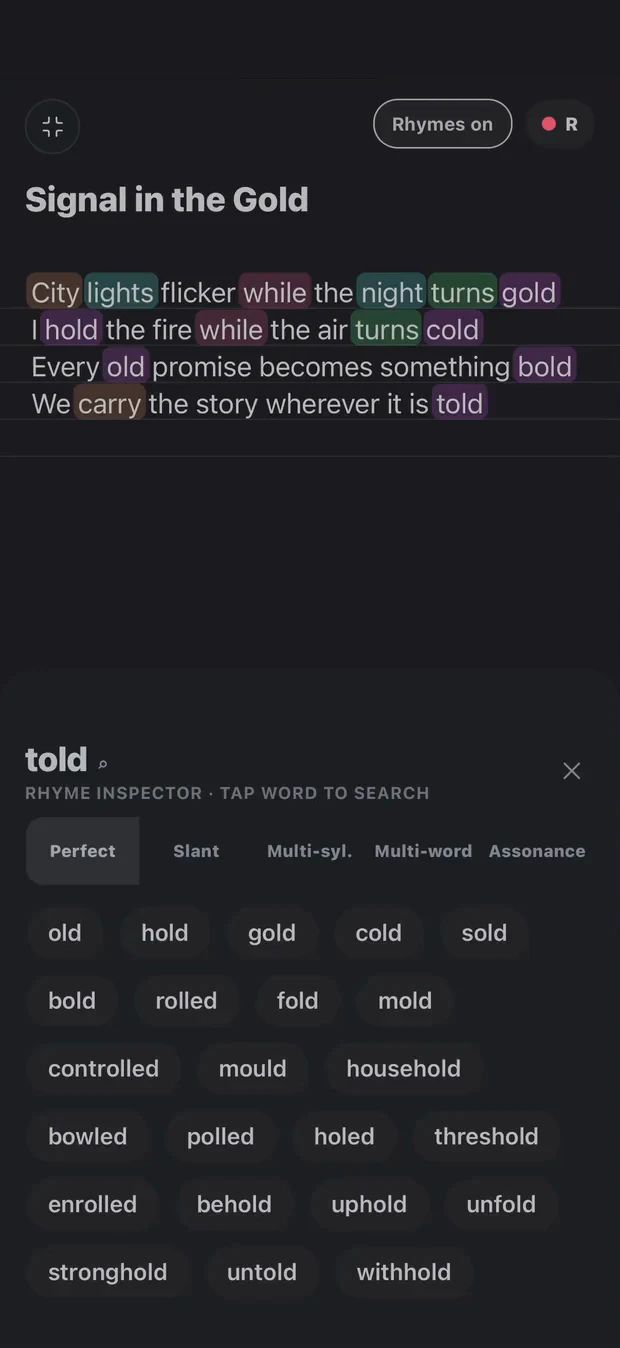
Stay with the beat while you work on the words. See the rhyme patterns, try another ending and record the delivery without moving the verse between apps.
Perfect rhymes share their stressed vowel and following sounds. Slant rhymes leave room for a looser connection. Multisyllabic rhymes carry a match across more than one syllable. Each gives you a different choice when the obvious ending feels forced.
Cadence puts those choices beside your writing. Highlighting shows possible connections; your accent, delivery and intended meaning decide which ones belong.
Set an A–B loop around the section you are working on. Keep the compact player beside the fullscreen editor, and use beat markers to return to a point you want to rehearse. You can try a line several ways without searching through the entire instrumental each time.
Check the delivery, not just the line length
A syllable count gives you a reference, but two lines with the same count can land differently. Record a take and listen for the stressed words, breaths and spaces. Move from a written draft into Arrange and the DAW when you are ready to build a demo.
You may already have tools you love. Here’s where each kind fits—and where Cadence brings the steps together.
A workflow comparison, not a feature rating of individual products.
Workspace
Use it for
Where Cadence fits
A notes app
Getting an idea down quickly.
Keep the lyric with its beat, takes and rhyme exploration.
A rhyme dictionary
Looking for another sound or ending.
Explore suggestions beside the verse you’re writing.
A full production DAW
Detailed recording, production and mixing.
Build a mobile demo from the same song workspace. Export when you’re ready to take it further.
Cadence
Developing your words into a performance.
Lyrics, beat loops, vocal takes, arrangement and a mobile DAW together.
Your words. Your way through.
Tools for your writing. Not writing in your place.
Explore a rhyme, loop a beat, capture a take. You decide what belongs in the song. Transcription helps put your recorded words on the page; it is not a replacement for your voice.