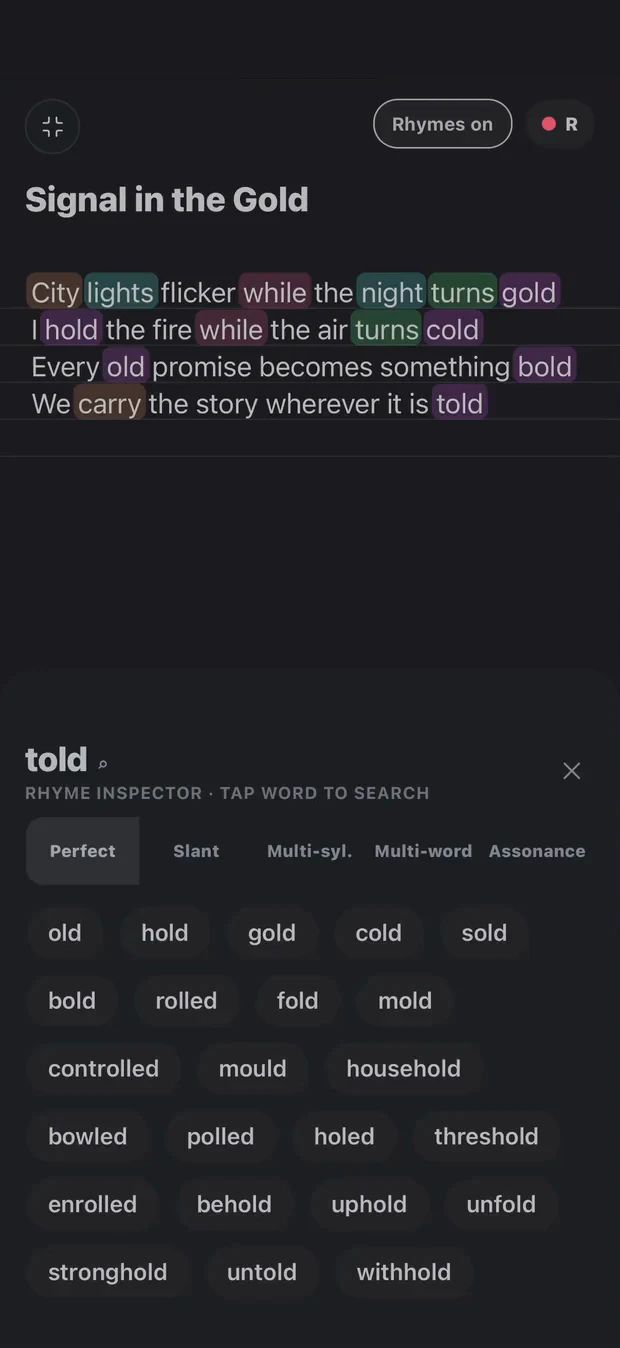
A lyric notepad is useful until the idea needs a beat, a second take or an ending you have not found yet. Cadence keeps those steps with the song. Write the verse, explore pronunciation-based rhyme families and return to the same lyric while the instrumental plays.
Perfect rhymes, slant rhymes, multisyllabic matches, multi-word rhymes and assonance provide different options. A suggestion still needs to work in your accent and sentence. Read it aloud before keeping it.
The current Google Play listing describes the Android offering and checks compatibility for your account. Store information checked 16 October 2026.
How to start a song on Android
Open the Library, choose New and give your lyric a title.
Open the song’s quick actions and choose Beat → Load beat to import an instrumental you can use.
Set the A–B loop around the passage you want to write. Use Rhymes when you need another sound, then record a rough take.
When the draft is ready, arrange the sections and continue into the DAW. Draft Demo and DAW creation require Pro.
Import a beat audio file, use the waveform to find the part you need and set independent A–B loop points. Draft while listening, then record a take over the instrumental. Comparing the recording with the words helps you hear where timing or breath needs attention.
Continue into Draft Demo, arrangement and the mobile DAW when you want to build the next version. See the type-beat writing workflow for an exercise you can try with your own instrumental.
Looking for a GarageBand alternative on Android?
Start with the part of GarageBand you need to replace. For writing lyrics, keeping ideas together and testing a vocal over a beat, Cadence provides a connected writing workflow. For instrument libraries, instrument performance or a specific production plugin, check the required feature directly rather than assuming that every music app is interchangeable.
Cadence has a mobile multitrack workspace; this does not make it a feature-for-feature GarageBand clone. The Cadence and GarageBand comparison explains the different jobs. The BandLab comparison is useful if you are choosing between writing and a broader production workflow.
Offline writing and your recordings
The store listing describes offline writing, an on-device rhyme engine and downloadable language packs. Download the packs you need while connected. Account access, purchases and downloads need a connection; offline writing does not mean every connected service works without one.
Recordings remain on your device unless you explicitly share or upload them. Signing in elsewhere is not a recording backup. Export important work before changing devices. For recorded ideas, follow the audio import and transcription workflow; Android share options depend on the app you export from.
Check the offer on your device
Start with three free notes. Pro unlocks unlimited new work and the complete Draft-to-DAW workflow. Google Play shows the device requirements, local plans and current price before you purchase. The website does not quote one price for every country.
Yes. Cadence is available on Google Play for Android. The listing describes lyrics, an on-device rhyme engine, beat loops, draft recording, arrangement and a mobile DAW. Google Play checks compatibility for your device and account.
Can I use Cadence offline on Android?
The app supports offline writing and its rhyme engine runs on device. Download any required language packs while connected. Account services, purchases and new downloads require a connection.
Is Cadence a free Android app?
Start with three free notes. Pro unlocks unlimited new work and the complete Draft-to-DAW workflow. Your Google Play purchase screen shows the available plans and current local price.
Your words. Your way through.
Tools for your writing. Not writing in your place.
Explore a rhyme, loop a beat, capture a take. You decide what belongs in the song. Transcription helps put your recorded words on the page; it is not a replacement for your voice.