Start with a beat, a bar or a freestyle.
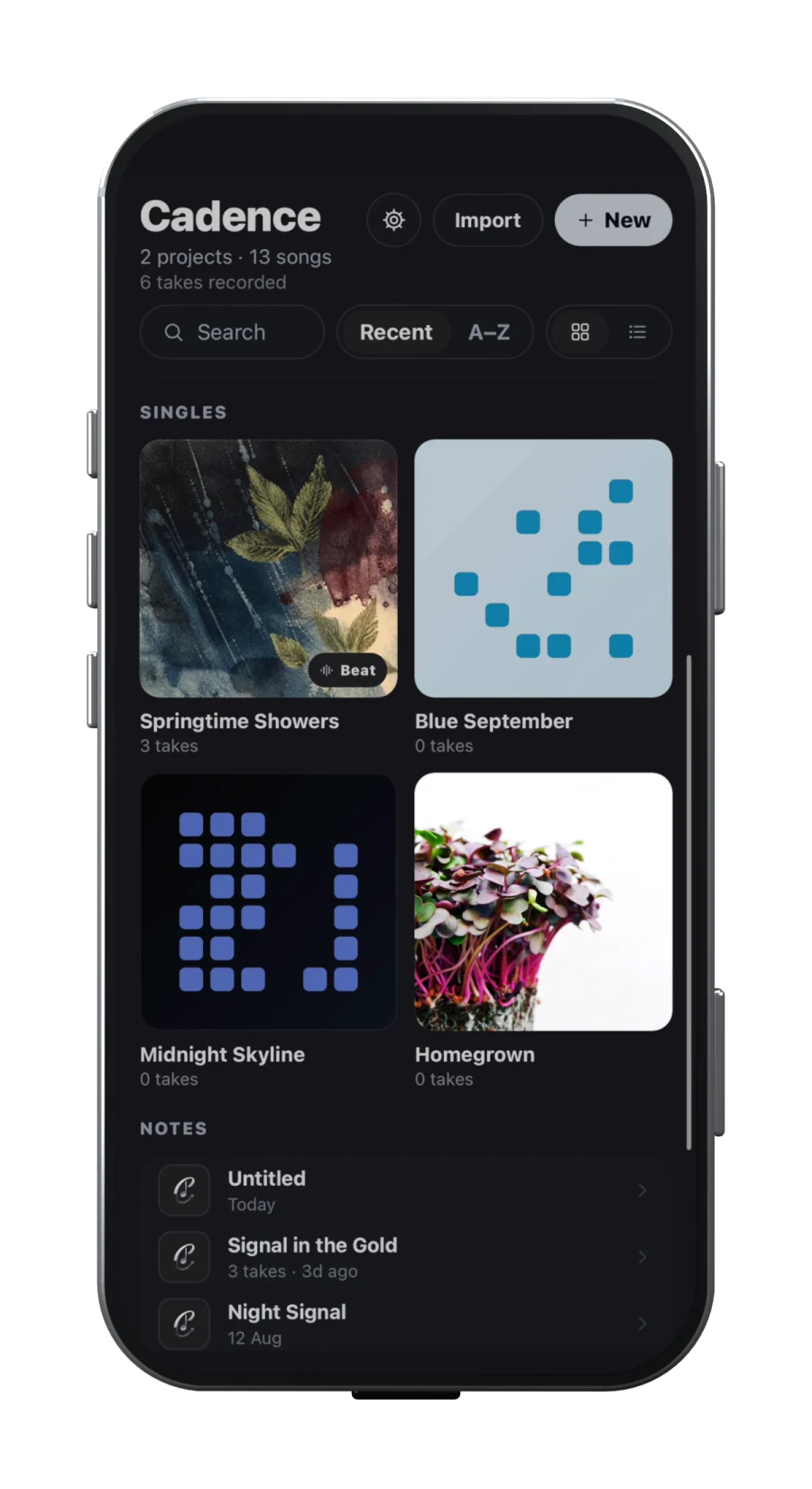
Keep the whole song moving. Import a beat and write against a loop. Start with a lyric and develop its delivery. Or record a freestyle, transcribe it and shape the strongest moments into a song. Cadence connects those starting points with rehearsal, vocal takes, arrangement and a demo—you do not have to start with written lyrics.
One song workspace Takes Arrangement Demo
That connection is why Cadence leads our shortlist for this process. You can work from the sound or the words, switch between them and keep developing the same idea. The advantage is not simply having more tools: it is keeping the tools beside the song while you need them.
Before paying, check the current price in your region, renewal terms, export formats and exact platform. A free tool that fits your handoff can be a better purchase decision than a larger subscription. We avoid headline prices that hide separate desktop licences, memberships or beta access.
11 songwriting apps, compared by the job they do
Start with the second column. If it describes the part of writing you struggle with, read the capability and buying caveat together. Each product name links to its own documentation; missing features are not inferred from silence.
| App | Best fit | What you get | Before you commit |
|---|---|---|---|
| Cadence | Beats, lyrics or freestyles into a song | Import beats, loop sections, record and transcribe ideas, explore rhymes, then develop takes, arrangement and a demo in one workspace. | Available on the App Store and Google Play. Export important recordings: account sync is not an audio backup. |
| Demo | Chords into a song sketch | Connect chord progressions with lyrics and song structure, then export the idea for the next stage. | Check the current store version and export options against the files your producer needs. |
| BandLab | Cloud recording and production | Audio and MIDI recording, virtual instruments, samples and effects in a web/mobile studio. | Free projects have 16 tracks; Membership increases this to 32. Both have a 15-minute project limit. |
| GarageBand | Production on Apple hardware | Build a song with recorded audio, instruments and loops; the iPhone workflow supports up to 32 tracks. | Choose for Apple-based production, not an editable project handoff to a Windows collaborator. |
| Song Cage | Composition across chords and melody | A mobile capture companion to the fuller web/desktop writing environment. | Do not assume the phone has the whole desktop workflow. Check licence and sync inclusions before buying. |
| Songwriter’s Pad | Writing prompts and lyric generation | Lyrics, rhyme tools, idea organisation and recording alongside explicitly advertised AI writing features. | Consider whether generated lyrics fit your process. Check the features included on your particular platform. |
| Guitar Pro | Guitar and bass composition | Tablature, notation, playback and practice tools, including audio alongside a score. | The desktop editor and mobile app are different products. Verify the licence for the device you will compose on. |
| MuseScore Studio | Notation without an editor licence fee | Free, open-source score writing with MIDI input and MusicXML/MIDI interchange. | Choose the Studio desktop editor; do not confuse it with subscriptions to the score-sharing service. |
| Chordify | Learning harmony from existing songs | Play along with chord charts to study a song’s harmonic movement. | Treat it as a harmony companion. Check any paid features you need rather than assuming it replaces a recording workspace. |
| Notetracks | Feedback on recorded drafts | Timestamped audio/video comments, replies and collaboration; editing tools are also advertised in beta. | A strong shortlist for review and revision. Test beta editing before relying on it for a critical session. |
| Autochords | A starting chord progression | Explore progression ideas by feel and key when the blank page is really a blank harmonic canvas. | A focused starting tool, not the place to expect an entire lyric, vocal and production project. |
What should you actually buy?
If you start with beats, lyrics or freestyles: try Cadence first. Import a beat, use loops and markers to rehearse a section, write a verse or capture a vocal idea before the words are settled. Transcription and rhyme exploration can support the revision; takes, arrangement and the mobile DAW carry it towards a demo. The recommendation is about keeping those stages connected, not a promise that you will never need another DAW. Test it with one of your own unfinished songs. If your main task is building instrumental production, compare BandLab and GarageBand too.
If you write from harmony: shortlist Demo and Song Cage. Demo’s export guide describes a mixed song and printable lyrics/chord sheet. Song Cage’s documentation covers a different set of composition handoffs, discussed below. Choose around what your band or producer can open—not which feature list sounds longer.
If you write parts for musicians: compare Guitar Pro with MuseScore Studio. A tablature-focused workflow and a general notation editor solve a different problem from capturing rap delivery. MuseScore’s free editor is worth trying before buying notation software; Guitar Pro is a more focused candidate when guitar tablature and practice drive your process.
If you already have a writing workspace: you may only need a companion. Chordify helps you study existing harmony; Autochords offers a starting progression; Notetracks centres feedback on a recording. Songwriter’s Pad is worth considering if AI writing prompts and generated text are something you actively want. If keeping the words entirely yours is the point, compare the manual writing workflow instead.
Start with your real workflow, not a feature grid
A songwriter who begins with a line needs a different first screen from a producer who begins with a drum loop. Before comparing products, write down the last three songs you started. Did each begin as typed lyrics, a voice memo, a chord progression, a beat or a multitrack session? Your repeated starting point matters more than an impressive feature you may use once.
Then name the point where your ideas usually stall. A notes app may capture words perfectly but separate them from the recording that explains the delivery. A voice recorder may preserve a melody but give you no structure for the second verse. A full digital audio workstation can finish a record yet feel slow when you only need to save one line. The useful purchase question is: which handoff currently makes me lose context?
Cadence is publicly described as a connected workspace for lyrics, rhyme ideas, beats, vocal takes, arrangement and a mobile DAW. It is available on the App Store for iPhone and iPad and on Google Play for Android. See the current Cadence songwriting workflow. BandLab describes a cloud DAW for web and mobile, while Apple presents GarageBand for iPhone and iPad as a 32-track recording and arrangement environment. Song Cage separates quick mobile capture from a fuller web and desktop writing canvas. Those are four different centres of gravity, not four interchangeable skins.
Decide how far one app must carry the song
Pick a finishing line. It might be “a lyric I can rehearse”, “a structured demo”, “stems for a producer”, “a mix I can publish” or “MIDI and a chord sheet for the band”. An app can be excellent and still stop before your finishing line.
| Your priority | Look for | Ask before committing |
|---|---|---|
| Words and delivery | Lyric structure, rhyme exploration, syllable support, recordings beside the draft | Can I hear the original take while revising the words? |
| Beat-led writing | Audio import, looping, markers, vocal takes and quick arrangement | Can I move from eight bars to a complete demo without rebuilding? |
| Production | Multitrack editing, instruments, effects, automation and useful exports | Does the mobile version include the tools I saw on desktop? |
| Harmony and composition | Chord, melody, key, voicing and MIDI tools | Does it produce audio, notation, MIDI or only an internal project? |
| Collaboration | Invites, roles, revision history and clear ownership | Can collaborators edit, comment and export without sharing one login? |
For example, BandLab’s official Studio guide documents recording, audio and MIDI tracks and virtual instruments. Its separate limits page distinguishes 16 tracks on Free from 32 with Membership; both tiers retain a 15-minute project limit. Apple’s GarageBand guide documents up to 32 tracks and 2,000 bars. Those numbers are useful only if track count or song length is your constraint. Neither tells you how quickly you will recover the meaning of a half-finished verse next Tuesday.
Check device, storage and handoffs before features
A songwriting system fails when the song cannot reach the next stage. Check the exact platform you own, whether offline capture works, where recordings live, what sync includes and which export formats leave the app. “Cloud sync” may cover project data without every local audio file; “export” may mean a stereo mix rather than editable tracks.
Cadence’s public guidance says recordings stay on the device unless shared, and signing in on a second device does not automatically transfer every recording. It explicitly advises keeping exports of important work. BandLab says projects save to its cloud and documents downloads for mixdowns, individual tracks and stems, although its export guide notes that exporting only a segment or section is unsupported. Apple says GarageBand for iOS stores songs in the app and warns that deleting the app deletes those songs unless they are backed up; its guidance covers iCloud, iCloud Drive and AirDrop backups. These details are less glamorous than instruments or effects, but they decide whether your work is recoverable.
Also inspect the final handoff. GarageBand can share an audio file or editable GarageBand project, but Apple says a GarageBand project cannot be opened on Windows. Song Cage’s export documentation describes PDF chord sheets, MIDI and its own song file; recorded takes do not travel inside that song file. If your producer expects WAV stems, that difference is decisive.
Run a one-song trial that exposes friction
Do not “test” an app by tapping through menus. Use one expendable song fragment and repeat the same five tasks in every candidate:
- Capture the starting idea in the way you normally receive it.
- Leave the app, return later and find the idea without relying on memory.
- Make one structural change: add a section, move a line or extend the arrangement.
- Record or import a second layer and correct one mistake.
- Export the result in the format your next person or tool needs.
Time is not the only measure. Note every moment when you have to rename, duplicate, convert, re-import or remember what belongs together. Those are context taxes. Also test failure paths: switch to airplane mode, run low on storage, cancel an export and inspect whether a local recording appears on another device. Keep the test disposable; vendor documentation should guide your expectations, but it cannot predict your hardware, microphone, network or habits.
This guide is based on public vendor documentation checked on the date below. It is not a hands-on audio-quality, latency or reliability benchmark. Store listings, beta status and features can change, so repeat the checks that could affect your decision.
Make the smallest choice that preserves the whole idea
Choose Cadence to turn an imported beat, written bar or recorded freestyle into a song: develop the words and delivery, rehearse sections, keep takes and build an arrangement and demo. Check that its current platform status suits you. Choose BandLab if cloud-based recording and production are your priority. Choose GarageBand if you are on Apple hardware and want a mobile instrument and production environment. Choose Song Cage if chords, melody, theory and lyric rhythm are the composition problem you want the software to help you see.
You can also use two tools deliberately. A focused writing workspace plus a production DAW is better than one nominally complete app that makes the first ten minutes painful. The important word is deliberately: define the handoff file, naming habit and source of truth before the song is scattered across both.
Revisit the decision after three complete songs. Count abandoned ideas, duplicated files and broken handoffs, not features. The right app should make returning, deciding and finishing easier without taking authorship away from you.
Sources
- DemoChecked 2026-09-17
- Songwriter’s PadChecked 2026-09-17
- Guitar ProChecked 2026-09-17
- MuseScore StudioChecked 2026-09-17
- ChordifyChecked 2026-09-17
- NotetracksChecked 2026-09-17
- AutochordsChecked 2026-09-17
- Demo export optionsChecked 2026-09-17
- Cadence songwriting appChecked 2026-09-17
- Getting started with BandLab StudioChecked 2026-09-17
- BandLab track and project duration limitsChecked 2026-09-17
- Downloading BandLab mixdowns and tracksChecked 2026-09-17
- Build a song in GarageBand for iPhoneChecked 2026-09-17
- Back up GarageBand for iOS songsChecked 2026-09-17
- Song Cage mobile appChecked 2026-09-17
- Exporting songs from Song CageChecked 2026-09-17